
What Is SiBot, FAQ Defaults?
Step-by-step instructions for creating and managing FAQ Defaults used by SiBot within Pharmacy Settings in SiCompounding.
Overview
SiBot is the built-in AI assistant within SiCompounding. SiBot answers user questions based on the FAQs configured in Pharmacy Settings.
Because pharmacy operations vary by location, workflow, and regulation, FAQs should be created to reflect:
- Pharmacy-specific procedures
- Internal processes
- Proper operational and compliance-related guidance
SiBot uses the FAQs you create to provide accurate, context-aware answers throughout the software.
Step-by-Step Instructions
Navigation Path
Settings → Pharmacy Defaults → FAQs
- Click the FileMaker Pro icon to open FileMaker.
- When FileMaker opens, locate the large menu bar on the left side of the window.
- Click SiCompounding (near the top of the menu).
- In the next window, several icons appear across the middle of the screen.
- Click Pharmacy to open the Pharmacy Dashboard.
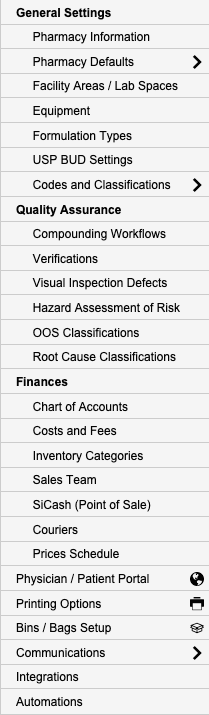
- From the blue sidebar menu on the left, select Settings (located at the bottom).
- Under General Settings, select Pharmacy Defaults.
Navigate to FAQ Defaults
- From the dropdown list, choose FAQs.
Creating a New FAQ
- When the FAQ section opens, click the + FAQ button.
- The View SMS Campaign popup window will open.
Configure the FAQ
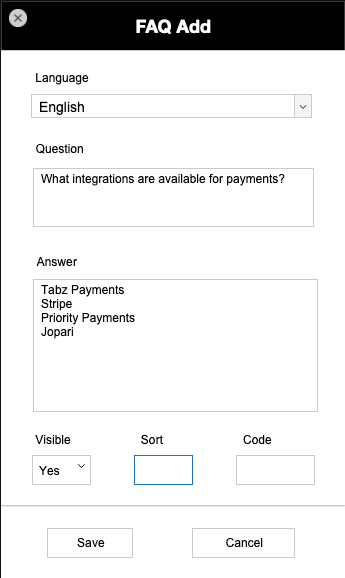
- Choose a Language from the dropdown field.
- Enter data into the following fields:
- Question
- Answer
- Visible
- Sort
- Code
- When finished:
- Click Save to update the information, or
- Click Cancel to discard any changes.
Viewing and Filtering FAQs
- Use the Language dropdown in the upper-right corner to filter the list of FAQs by language.
Managing Existing FAQs
Actions Column
- In the Actions column, click the gear (settings) icon.
- A popup menu with two options will appear.
Edit an FAQ
- Select Edit for the FAQ that requires modification.
- The FAQ Information window will open.
- Update the required data fields.
- Click Save when complete.
Delete an FAQ
- Select Delete to remove the FAQ.
- A Deletion Confirmation dialog box will appear with two options:
- DELETE – Permanently deletes the FAQ
- CANCEL – Closes the dialog without deleting
Warning:
Deleting an FAQ permanently removes it and will immediately affect SiBot responses.
Greeting Information
- Enter Greeting Info to define default greeting messages.
- These greetings are used throughout the software where applicable, including SiBot interactions.
Pharmacy Settings (System Foundation)
Pharmacy Settings provide the foundational templates and defaults required for system operation. These settings must be completed before using other areas of SiCompounding.
Best Practice: Enter all available and required data for each section and subsection to ensure proper system behavior, compliance, and reporting across SiCompounding.
Related Configuration Areas
- Pharmacy Defaults
- SiBot Configuration
- Automations and Logs
- Notifications and Integrations
Setting Up Positive Identification Defaults?
Step-by-step instructions for configuring Positive Identification Defaults within Pharmacy Settings in SiCompounding.
What are EDI Settings?
Step-by-step instructions for configuring EDI (Electronic Data Interchange) Settings within Pharmacy Settings in SiCompounding.