
Setting Up Positive Identification Defaults?
Step-by-step instructions for configuring Positive Identification Defaults within Pharmacy Settings in SiCompounding.
Overview
In pharmacy operations, Positive Identification refers to verifying the identity of the individual who is prescribed, administers, or dispenses a drug. This process ensures accountability, accuracy, and compliance, and is especially critical for controlled substances and potentially dangerous medications.
Positive Identification Defaults are configured within Pharmacy Settings and define when identity verification is required throughout prescription, verification, dispensing, and compounding workflows.
Step-by-Step Instructions
Navigation Path
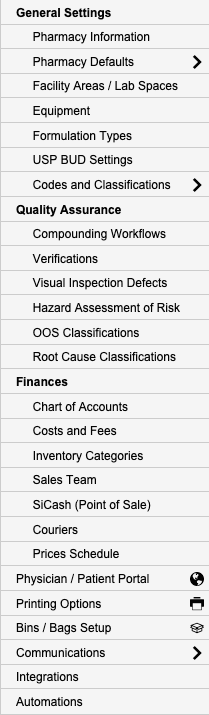
Settings → Pharmacy Defaults → Positive Identification
- Click the FileMaker Pro icon to open FileMaker.
- When FileMaker opens, locate the large menu bar on the left side of the window.
- Select SiCompounding (near the top of the menu).
- In the next window, click Pharmacy from the icons displayed across the middle of the screen. This opens the Pharmacy Dashboard.
- From the blue sidebar menu on the left, select Settings (located at the bottom).
- Under General Settings, select Pharmacy Defaults.
Navigate to Positive Identification Defaults
- From the dropdown list, choose Positive Identification.
Settings: Positive Identification Questions
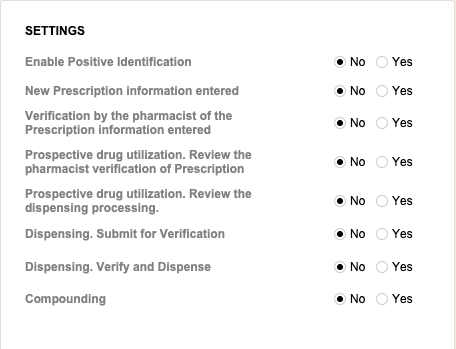
Configure when Positive Identification is required during pharmacy workflows. Each setting can be enabled or disabled based on operational and regulatory requirements.
| Setting | Options |
|---|---|
| Enable Positive Identification | Yes / No |
| New Prescription Information Entered | Yes / No |
| Verification by the Pharmacist of the Prescription Information Entered | Yes / No |
| Prospective Drug Utilization – Pharmacist Verification of Prescription | Yes / No |
| Prospective Drug Utilization – Dispensing Processing | Yes / No |
| Dispensing – Submit for Verification | Yes / No |
| Dispensing – Verify and Dispense | Yes / No |
| Compounding | Yes / No |
Pharmacy Settings (System Foundation)
Pharmacy Settings provide the foundational templates and defaults required for system operation. These settings must be completed before using other areas of SiCompounding.
Best Practice: Enter all available and required data for each section and subsection to ensure proper system behavior, compliance, and reporting across SiCompounding.
Related Configuration Areas
- Pharmacy Defaults
- Dispensing Workflows
- Pharmacist Verification
- Automations and Logs