
What are EDI Settings?
Step-by-step instructions for configuring EDI (Electronic Data Interchange) Settings within Pharmacy Settings in SiCompounding.
Overview
EDI (Electronic Data Interchange) over SFTP is a secure method for exchanging business documents between partners. It combines the structured data of EDI with the encrypted file transfer of SFTP, ensuring security, reliability, and compliance in data exchange.
The EDI Settings section within Pharmacy Settings is where EDI configuration is managed. Proper setup is essential for automated communication with trading partners.
Note:
Contact Isak Computing for assistance with setup or updating the EDI configuration fields.
Step-by-Step Instructions
Navigation Path
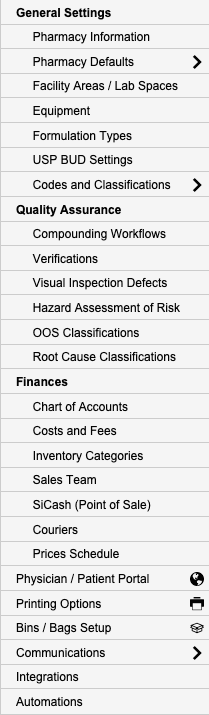
Settings → Pharmacy Defaults → EDI Settings
- Click the FileMaker Pro icon to open FileMaker.
- When FileMaker opens, locate the large menu bar on the left side of the window.
- Click SiCompounding (near the top of the menu).
- In the next window, several icons appear across the middle of the screen.
- Click Pharmacy to open the Pharmacy Dashboard.
- From the blue sidebar menu on the left, select Settings (located at the bottom).
- Under General Settings, select Pharmacy Defaults.
Navigate to EDI Settings
- From the dropdown list, choose EDI Settings.
EDI Configuration Fields
The following information must be entered to configure EDI communications over SFTP:
| Field | Description |
|---|---|
| EDI Client ID | Unique identifier assigned to your pharmacy for EDI transactions. |
| EDI SFTP Hostname | The hostname of the SFTP server used for EDI transfers. |
| EDI SFTP Username | Username for accessing the SFTP server. |
| EDI SFTP Password | Password associated with the SFTP account. |
Important:
These fields must be provided or updated in consultation with Isak Computing to ensure secure and accurate EDI operation.
Pharmacy Settings (System Foundation)
Pharmacy Settings provide the foundational templates and defaults required for system operation. These settings must be completed before using other areas of SiCompounding.
Best Practice: Enter all available and required data for each section and subsection to ensure proper system behavior, compliance, and reporting across SiCompounding.
Related Configuration Areas
- Pharmacy Defaults
- Integrations
- Automations and Logs
- EDI Communications