
Setting Up Inventory & Purchase Order Defaults?
Step-by-step guide for configuring Inventory and Purchase Order default settings within Pharmacy Defaults in SiCompounding.
Overview
The Inventory & PO Defaults section within Pharmacy Defaults defines the default behaviors applied to inventory items and purchase orders across SiCompounding. These settings control storage areas, verification requirements, authorization limits, expiration handling, and automated inventory selection logic.
Important: Pharmacy Settings must be fully configured before using any other area of SiCompounding. Inventory and PO Defaults directly affect compliance, traceability, and system automation.
Step-by-Step Instructions
Navigation Path
- Click the FileMaker Pro icon to open FileMaker.
- When FileMaker opens, locate the large menu bar on the left side of the window.
- Click SiCompounding (near the top of the menu).
- In the next window, several icons appear across the middle of the screen.
- Click Pharmacy to open the Pharmacy Dashboard.
- From the blue sidebar menu on the left, select Settings (located at the bottom).
- Under General Settings, select Pharmacy Defaults.
- From the dropdown list, choose Inventory and PO.
Editing Inventory & PO Defaults
- In the Inventory Defaults section, select Edit.
- The Inventory and Purchase Orders Defaults window opens.
- Configure the Inventory, Purchase Order, and Auto Pick settings described below.
Inventory Defaults
These settings define how inventory is stored, verified, and managed during compounding and dispensing.
Default Storage Area

- Select the default storage area from the dropdown value list.
Inventory - Verification and Control Options
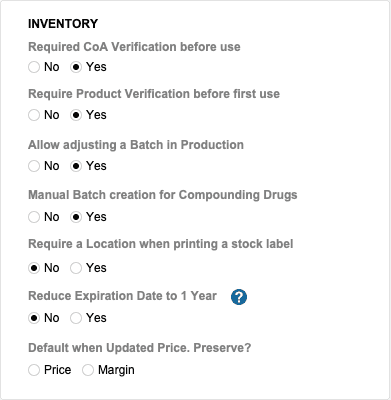
All options are configured as Yes / No unless otherwise noted:
-
Required COA Verification before Use (Yes | No)
-
Required Product Verification before First Use (Yes | No)
-
Allow Adjusting a Batch in Production (Yes | No)
-
Manual Batch Creation for Compounding Drugs (Yes | No)
-
Require a Location when Printing a Stock Label (Yes | No)
-
Reduce Expiration Date to 1 Year (Yes | No)
When enabled, for commercially available drugs, the expiration date is reduced to one year from the dispense date or the manufacturer expiration date, whichever is earlier.
Purchase Orders
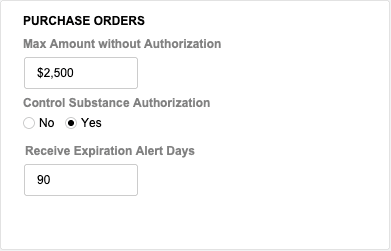
These settings control authorization thresholds and expiration alerts for purchase orders.
-
Max Amount without Authorization
- Enter the maximum dollar amount allowed before authorization is required.
-
Controlled Substance Authorization (Yes | No)
-
Receive Expiration Alert Days
- Enter the number of days prior to expiration to trigger alerts.
Auto Pick Settings
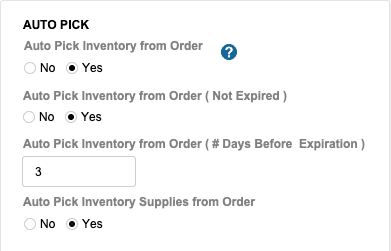
Auto Pick settings determine how SiCompounding automatically selects inventory during order fulfillment.
-
Auto Pick Inventory from Order (Yes | No)
When enabled, SiCompounding selects the most suitable inventory for the prescription based on:
- Storage conditions
- Dispense days
- Inventory production date
-
Auto Pick Inventory from Order (Not Expired) (Yes | No)
-
Auto Pick Inventory from Order (# Days Past Expired)
- Enter the number of days past expiration that inventory may still be considered eligible.
-
Auto Pick Inventory Supplies from Order (Yes | No)
Saving Changes
- Click Save to apply all changes.
- Click Cancel to discard any changes made.
Pharmacy Settings (System Foundation)
Pharmacy Settings provide the foundational templates and defaults required for system operation. These settings must be completed before using other areas of SiCompounding.
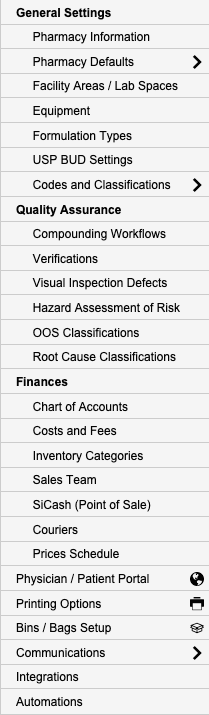
Best Practice: Enter all available and required data for each section and subsection to ensure proper system behavior, compliance, and reporting across SiCompounding.
Summary
Proper configuration of Inventory & PO Defaults ensures controlled inventory usage, compliant purchasing workflows, and accurate automated inventory selection across SiCompounding.