
Where to Set Up Formula Defaults?
Step-by-step instructions for configuring Formula Defaults within Pharmacy Defaults in SiCompounding.
Overview
Formula Defaults control the system-wide tolerances, sampling rules, verification behavior, decimal precision, and default statements applied to formulations in SiCompounding. These settings directly affect compounding accuracy, quality checks, and documentation generated during formulation and production.
Important: Pharmacy Settings must be completed before using any other area of SiCompounding. Formula Defaults influence calculations, sampling logic, and verification workflows across the system.
Step-by-Step Instructions
Navigation Path
- Click the FileMaker Pro icon to open FileMaker.
- When FileMaker opens, locate the large menu bar on the left side of the window.
- Click SiCompounding (near the top of the menu).
- In the next window, several icons appear across the middle of the screen.
- Click Pharmacy to open the Pharmacy Dashboard.
- From the blue sidebar menu on the left, select Settings (located at the bottom).
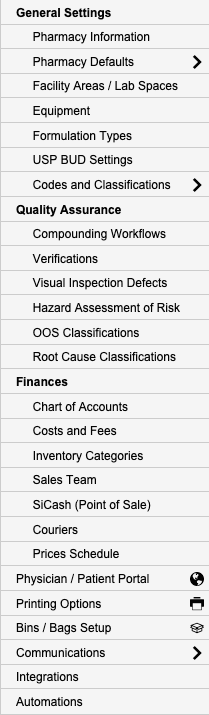
- Under General Settings, select Pharmacy Defaults.
- From the dropdown list, choose Formulas.
Editing Formula Defaults
- In the Formulas Defaults section, click Edit.
- The Formulations Settings window opens, allowing you to add and edit formula-related default data.
Default Weight Tolerance
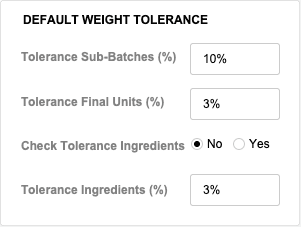
The Default Weight Tolerance section defines the allowable percentage margin of error for a formula’s final volume, ingredients, and each individual dose.
- Select Edit within the Default Weight Tolerance section.
- Configure the following fields:
-
Tolerance Sub-Batches (%)
- Enter the allowed percentage variance for sub-batches.
-
Tolerance Final Units (%)
- Enter the allowed percentage variance for final units.
-
Check Tolerance Ingredients (Yes | No)
-
Tolerance Ingredients (%)
- Enter the allowed percentage variance for individual ingredients.
Weight Assessment Settings (USP)

The Weight Assessment Settings section defines acceptable margins of error and sampling requirements in alignment with USP guidance.
- Configure the percent margin of error allowed for sampled units.
- Define how many capsules are tested when the batch size is over 100 capsules.
If the batch size is under 100 capsules, the sample size defaults to 10% of the batch size.
If the first sample fails, the second sample size percentage and minimum values are applied.
Sampling Configuration
-
1st Sample Size (%)
- Enter percentage
-
2nd Sample Size (%)
- Enter percentage
-
1st Sample Size (Min)
- Enter minimum number
-
2nd Sample Size (Min)
- Enter minimum number
Default Statements
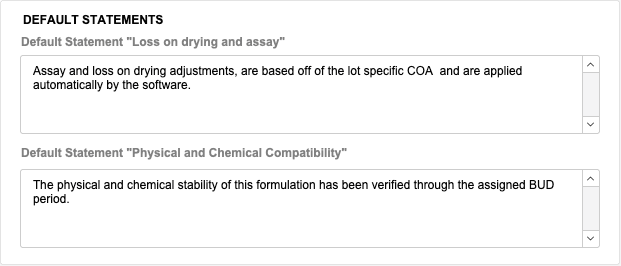
Default statements are automatically applied to formulations and related documentation.
Loss on Drying and Assay
- Assay and loss-on-drying adjustments are based on the lot-specific COA.
- Adjustments are applied automatically by the software.
Physical and Chemical Compatibility
- Confirms that the physical and chemical stability of the formulation has been verified through the assigned BUD period.
Default Number of Decimal Places
This setting defines the default number of decimal places displayed in formula calculations.
- Useful for weights, calculations with repeating numbers, and precision control.
- Enter the number of decimal places you want to display throughout the system.
Default Verifications
Default Verifications determine whether formulas automatically follow a two-step verification process.
- Formula 2-Step Verification (Yes | No)
When enabled, formulas will require a two-step verification workflow by default.
Saving Changes
- Click Save to apply all changes.
- Click Cancel to discard any changes made.
Pharmacy Settings (System Foundation)
Pharmacy Settings provide the foundational templates and defaults required for system operation. These settings must be completed before using other areas of SiCompounding.
Best Practice: Enter all available and required data for each section and subsection to ensure proper system behavior, compliance, and reporting across SiCompounding.
Summary
Configuring Formula Defaults ensures consistent tolerance enforcement, USP-aligned sampling, precise calculations, and reliable verification workflows across all formulations in SiCompounding.