
What Accounting Integrations?
Step-by-step guide to configure accounting integrations in SiCompounding for pharmacy financial management.
Overview
The Accounting Integrations section allows your pharmacy to connect SiCompounding with external accounting systems to streamline financial management, reporting, and compliance. Supported integrations include QuickBooks Online and NetSuite.
Step-by-Step Instructions
Navigation Path
- Click the FileMaker Pro icon to open FileMaker.
- From the left-hand menu, click SiCompounding.
- In the main window, select Pharmacy to open the dashboard.
- From the blue sidebar, select Settings.
- Scroll below Communications, select Integrations (Accounting).
- Switch to the Accounting tab to view available integrations.
Available Accounting Integrations
QuickBooks Online

Purpose: Provides a range of accounting features beneficial for small to medium-sized pharmacies and research firms.
Setup Steps:
- Click Connect.
Note: This integration is currently under development.
NetSuite

Purpose: Offers a comprehensive solution for finance, supply chain, inventory, and customer management tailored to pharmaceutical companies.
Setup Wizard
Step 1: Establish Tokens & API Environment
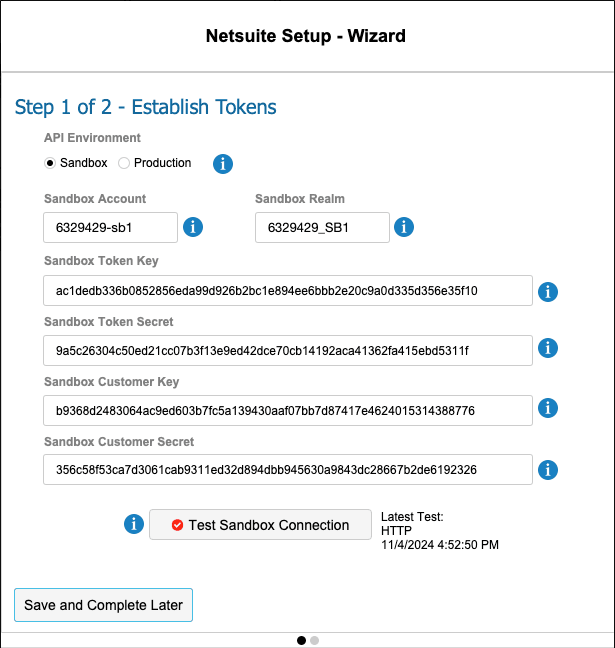
- Choose your Environment:
- Sandbox – testing environment for safe connection without affecting live data
- Production – live connection affecting real data
- Enter required credentials:
- Sandbox/Production Account
- Sandbox/Production Realm
- Token Key & Token Secret
- Customer Key & Customer Secret
- Test the connection:
- Use the Test Sandbox Connection button to verify the setup.
- Ensure a successful connection before proceeding.
Step 2: Link Pharmacy to NetSuite
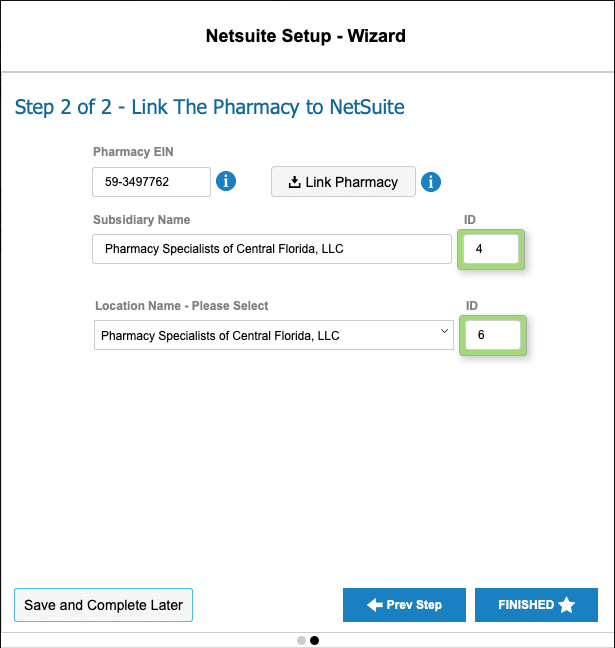
- Enter the following details:
- Pharmacy EIN – Federal ID number (found in
System File → Company Details) - Subsidiary Name
- Location Name (select from dropdown for multiple locations)
- Pharmacy EIN – Federal ID number (found in
- Use the Link Pharmacy button to connect your pharmacy to the corporate NetSuite system.
- Save your progress:
- Click Save and Complete Later if you need to return to this step.
- Use < Prev Step to make changes to Step 1.
- Finalize the setup:
- Click Finished when all steps are complete.
Pharmacy Settings (System Foundation)
Pharmacy Settings provide the foundational templates and defaults required for system operation. These settings must be completed before using other areas of SiCompounding.
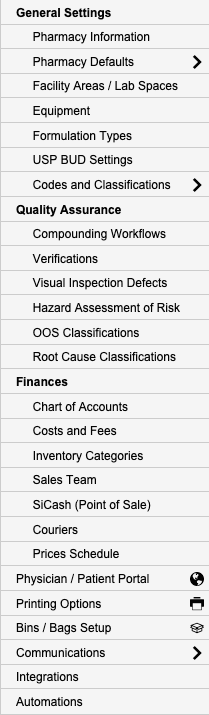
Best Practice: Enter all available and required data for each section and subsection to ensure proper system behavior, compliance, and reporting across SiCompounding.
This completes the guide for Accounting Integrations in SiCompounding.