
Artificial Intelligence Integration: Who’s in Charge?
Step-by-step guide for AI integration setup in SiCompounding. Currently under development.
Overview
The AI Integrations section is intended to allow your pharmacy to connect SiCompounding with artificial intelligence tools for advanced automation, analytics, and decision support. This functionality is currently under development.
Step-by-Step Instructions
Navigation Path
- Click the FileMaker Pro icon to open FileMaker.
- From the left-hand menu, click SiCompounding.
- In the main window, select Pharmacy to open the dashboard.
- From the blue sidebar, select Settings.
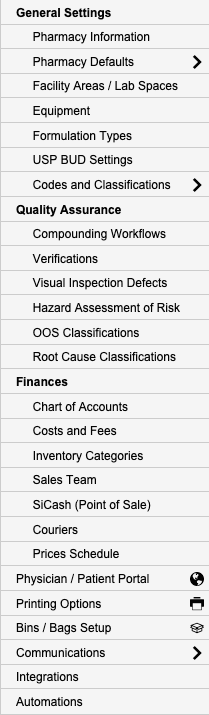
- Scroll below Communications and select Integrations (AI).
- Switch to the Artificial Intelligence tab to view available AI integrations.
Available AI Integrations
Currently under development. No AI integrations are available at this time.
Pharmacy Settings (System Foundation)
Pharmacy Settings provide the foundational templates and defaults required for system operation. These settings must be completed before using other areas of SiCompounding.
Best Practice: Enter all available and required data for each section and subsection to ensure proper system behavior, compliance, and reporting across SiCompounding.
This completes the guide for Artificial Intelligence Integrations in SiCompounding.