
Webhooks Integrations?
Step-by-step guide to configure webhook integrations in SiCompounding for real-time notifications and streamlined workflows.
Overview
Webhooks provide a real-time, automated method for applications to communicate with each other. They are essential for streamlining workflows, ensuring data synchronization, and enabling faster notifications and responses in the pharmaceutical industry.
Step-by-Step Instructions
Navigation Path
- Click the FileMaker Pro icon to open FileMaker.
- From the left-hand menu, click SiCompounding.
- In the main window, select Pharmacy to open the dashboard.
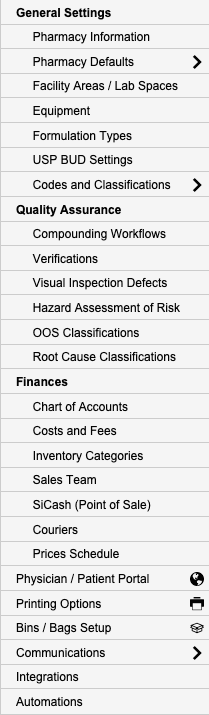
- From the blue sidebar, select Settings.
- Scroll below Communications, select Integrations (Webhooks).
- Switch to the Webhooks tab to view available integrations.
Available Webhooks
New Rx

Purpose: Triggered when a new prescription is created.
Setup Steps:
- Click Edit to view and configure the following:
- Institutions
- Event Type
- Endpoint
- Status
- Actions (use the gear icon to modify or remove the Institution).
Canceled Rx

Purpose: Triggered when a prescription is canceled.
Setup Steps:
- Click Edit to maintain Institutions.
Transferred Rx

Purpose: Triggered when a prescription is transferred to another pharmacy.
Setup Steps:
- Click Edit to maintain Institutions.
New Order

Purpose: Notification when a new order is created.
Setup Steps:
- Click Edit to maintain Institutions.
Order In Pharmacy

Purpose: Workflow notification when an order arrives at the pharmacy.
Setup Steps:
- Click Edit to maintain Institutions.
Order Ready to Pack

Purpose: Workflow notification when an order is ready to be packed.
Setup Steps:
- Click Edit to maintain Institutions.
Order Ready to Ship

Purpose: Workflow notification when an order is ready for shipment.
Setup Steps:
- Click Edit to maintain Institutions.
Order Shipped

Purpose: Notification when an order is shipped.
Setup Steps:
- Click Edit to maintain Institutions.
Batch

Purpose: Notification when a batch is processed.
Setup Steps:
- Click Edit to maintain Institutions.
Pharmacy Settings (System Foundation)
Pharmacy Settings provide the foundational templates and defaults required for system operation. These settings must be completed before using other areas of SiCompounding.
Best Practice: Enter all available and required data for each section and subsection to ensure proper system behavior, compliance, and reporting across SiCompounding.
This completes the guide for Webhooks Integrations in SiCompounding.