
Finding the Chart of Accounts
Step-by-step guide to access and manage the Chart of Accounts in SiCompounding.
Finding the Chart of Accounts
A pharmaceutical Chart of Accounts (COA) is a structured list of all financial accounts used to track and report financial transactions in the pharmaceutical industry. It helps manage, report, and analyze the financial performance of pharmaceutical companies, encompassing activities like research and development, regulatory compliance, and product licensing. Throughout SiCompounding, accounts can be accessed from the Account Value List wherever needed.
Step-by-Step Instructions
Navigation Path
- Click the FileMaker Pro icon to open FileMaker.
- In the left-hand menu, click SiCompounding (near the top).
- In the main window, click Pharmacy to open the Dashboard.
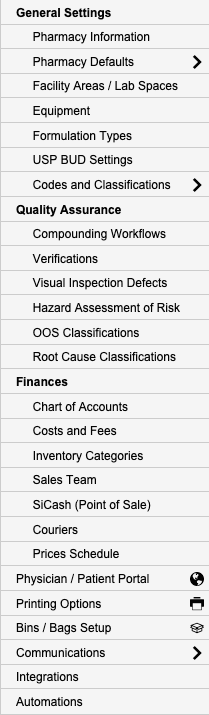
- In the blue sidebar menu on the left, select Settings (located at the bottom).
- Under Finances, select Chart of Accounts.
Chart of Accounts Window
The Chart of Accounts window displays a list of accounts with the following columns:
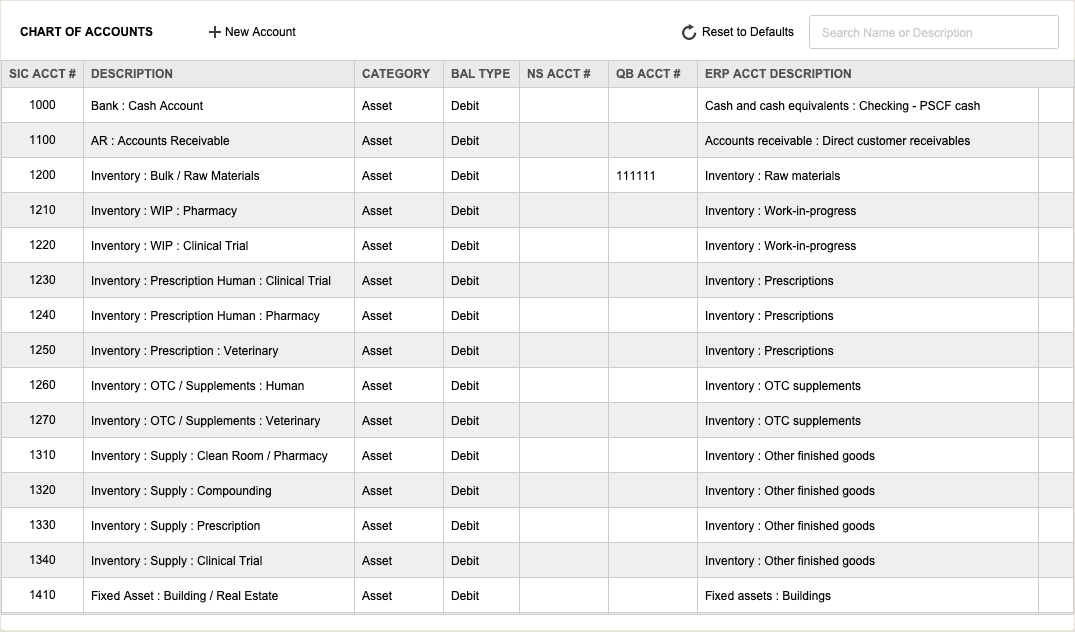
- SIC Acct #: Account Name \ Financial Location.
- Description: Assigned code unique to this account.
- Category: Assets, Liability, Equity, Revenue, COGs, and Expense Accounts.
- Bal Type: Usually Debit or Credit.
- NS Acct #: Oracle NetSuite related Account Number.
- QB Acct #: QuickBooks related Account Number.
- ERP Acct Description: Enterprise Resource Planning: Standard account names.
Actions
-
Create a New Account:
- Click the + New Account button.
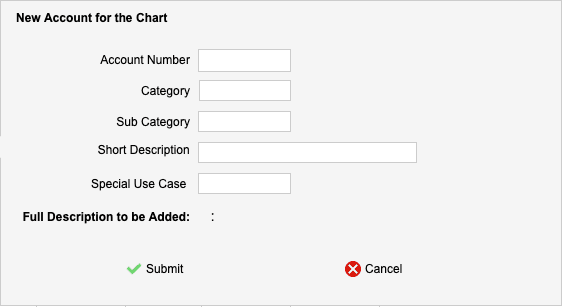
- Fill in the required details for the new account.
- Click Submit after making changes.
- Click the + New Account button.
-
Reset to Defaults:
- Click Reset to Defaults to trigger an alert.
- Choose Cancel or OK to reset all values to defaults.
-
Search Accounts:
- Use the Search bar in the upper-right corner to search by Name or Description.
- Press the Enter/Return key on your keyboard to view search results.
Pharmacy Settings (System Foundation)
Pharmacy Settings provide the foundational templates and defaults required for system operation. These settings must be completed before using other areas of SiCompounding.
Best Practice: Enter all available and required data for each section and subsection to ensure proper system behavior, compliance, and reporting across SiCompounding.
This completes the guide for Finding the Chart of Accounts in SiCompounding.