
What is a Root Cause Classification?
Professional guide for creating and managing Root Cause Classifications in SiCompounding.
Overview
Root Cause Analysis (RCA) is a structured approach to investigate the underlying causes of incidents or deviations and prevent recurrence. In pharmacy, RCA identifies system-level lapses that contribute to errors, promotes shared learning, and improves patient safety. Root Cause Classifications in SiCompounding provide a simple taxonomy (Category → Root Cause) to tag incidents, CAPA items, and QA findings for consistent analysis and reporting.
Navigation Path
Settings → Quality Assurance → Root Cause Classification
What is a Root Cause Classification?
A Root Cause Classification is a concise, reusable label used to categorize the underlying cause of an incident, deviation, or CAPA record. Classifications are structured as Category → Root Cause and are used across investigations to standardize reporting, trend analysis, and corrective action planning.
Step-by-Step Instructions
Navigation Path
- Click the FileMaker Pro icon to open FileMaker.
- In FileMaker's left-side menubar select SiCompounding (near the top).
- In the center icons, click Pharmacy to open the Dashboard.
- From the blue sidebar, select Settings (bottom) → Quality Assurance → Root Cause Classification.
Root Cause Classification Window (Overview)
The Root Cause Classification window presents a two-column layout used to manage classifications:
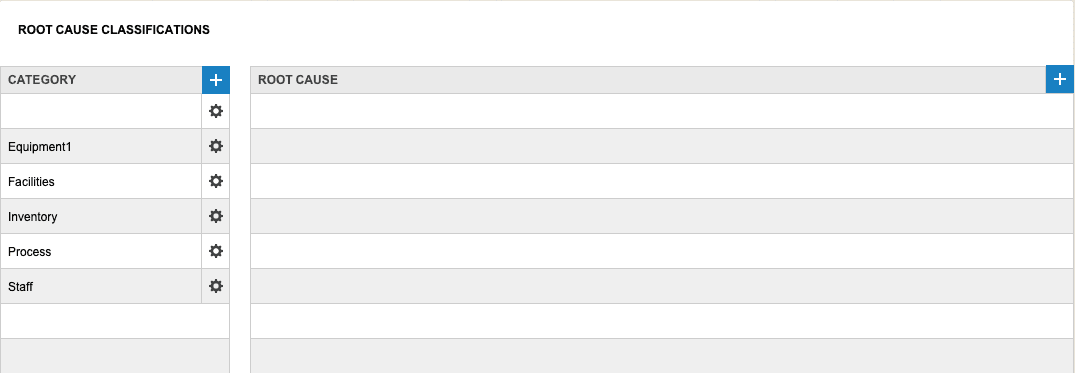
- Category — High-level grouping (example: Equipment failure)
- Root Cause — Specific cause within the category (examples: Lack of maintenance, Technical failure)
The Root Cause Classification window opens to a two-column input for each classification. Use the left column for Category and the right column for associated Root Causes.
Fields Table
| Field | Description | Example |
|---|---|---|
| Category | High-level classification used for grouping root causes | Equipment failure |
| Root Cause | Specific cause tied to a Category for RCA and CAPA tagging | Lack of maintenance |
Creating and Managing Classifications
-
Create a Category
- Click the + button under Category.

- The CAPA Classification popup opens.
- Opens CAPA Classification popup — enter or change the Category name (and optional description), then click Save.
- Click the + button under Category.
-
Edit or Delete a Category
- Click the gear (⚙) icon next to a Category.
- Choose Edit to modify the name or Delete to remove the record. Confirm deletion if prompted.
-
Add a Root Cause
- Select the desired Category.
- Click the + button under Root Cause.
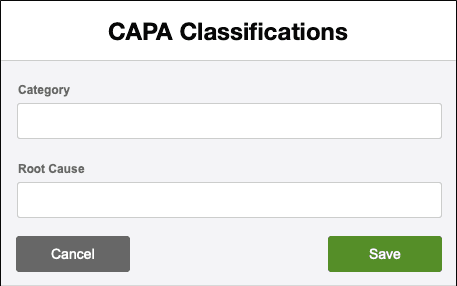
- The CAPA Classification popup opens. Enter the Root Cause text and click Save.
- Opens CAPA Classification popup — enter or change the Root Cause text, then click Save.
-
Edit or Delete a Root Cause
- Click the gear (⚙) icon next to a Root Cause.
- Choose Edit to change the entry or Delete to remove it. Confirm deletion if prompted.
Best Practices
Note: Each + opens the same CAPA Classification popup used for creating or updating entries.
Examples (Common Use Cases)
| Category | Root Cause |
|---|---|
| Equipment failure | Lack of maintenance |
| Equipment failure | Technical failure (motor/electronics) |
| Process deviation | Procedure not followed |
| Human factors | Inadequate training |
| Supply chain | Contaminated raw material |
| Documentation | Missing stability protocol |
Best Practices
- Use concise, standardized names for Categories and Root Causes to ensure consistent tagging across QA events.
- Model Categories to reflect your operational and reporting structure (e.g., Equipment, Process, Human Factors).
- Link Root Cause entries to CAPA workflows and incident records so investigations and corrective actions are traceable.
- Periodically review classifications and consolidate duplicates to keep the taxonomy useful.
Pharmacy Settings (System Foundation)
Pharmacy Settings provide the foundational templates and defaults required for system operation. These settings must be completed before using other areas of SiCompounding.
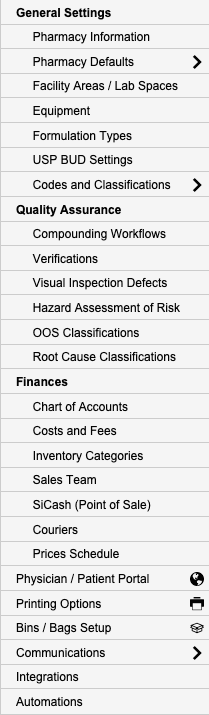
Best Practice: Enter all available and required data for each section and subsection to ensure proper system behavior, compliance, and reporting across SiCompounding.
This completes the guide for Root Cause Classification in SiCompounding.