
Adding Hazard Assessment Of Risk?
Step-by-step guide for creating and maintaining Hazard Assessment Of Risk records in SiCompounding.
Overview
Hazard assessment identifies potential sources of harm or danger in the pharmaceutical environment; risk assessment evaluates the likelihood and severity of those identified hazards to determine the overall risk level. In SiCompounding, Hazard Assessments are managed in Quality Assurance and are required when adding a new inventory item.
For the official list of hazardous drugs, refer to: NIOSH List of Hazardous Drugs
Step-by-Step Instructions
Navigation Path
Settings → Quality Assurance → Hazard Assessment Of Risk
- Click the FileMaker Pro icon on your computer to launch FileMaker.
- When FileMaker opens, locate the large menu bar on the left side of the window.
- Click SiCompounding (near the top of the menu).
- In the next window, several icons will appear across the middle of the screen.
- Click Pharmacy to open the Pharmacy Dashboard.
- From the blue sidebar menu on the left side:
- Scroll to the bottom.
- Select Settings.
Navigate to Hazard Assessment Of Risk
- Under Quality Assurance, select Hazard Assessment Of Risk.
- The Hazard Assessment Of Risk window opens, displaying Hazard Assessment Groups and their related Activities.
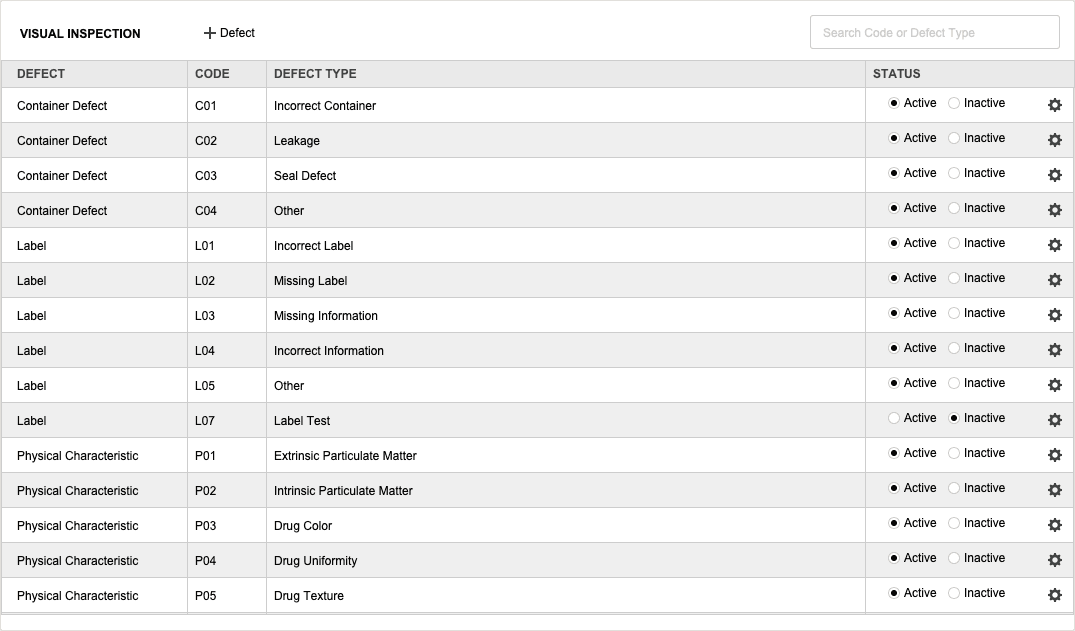
Groups (Hazard Assessment Groups)
The left side of the window lists Hazard Assessment Groups. Each group represents a set of related activities and risk evaluations.
| Column | Description |
|---|---|
| Code | Unique code identifier for the Hazardous Drug Group |
| Description | Important information related to the hazardous risks of this group |
| Actions | Gear icon with options: Edit, Delete, Change Logs |
Create a New Hazardous Drug Group
-
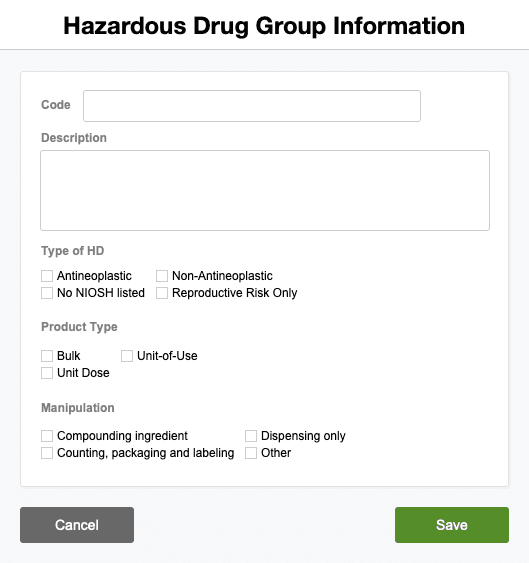
Click + Group to open the Hazardous Drug Group popup.
-
Enter the following fields:
Field Description Code Unique code for this group Description Important information about the hazardous risks for this group Type of HD Multi-select: Antineoplastic / Non-Antineoplastic / No NIOSH Listed / Reproductive Risk Only Product Type Multi-select: Bulk / Unit-of-Use / Unit Dose Manipulation Multi-select: Compounding Ingredient / Dispensing Only / Counting, Packaging, and Labeling / Other -
Click Save to add the group.
Activities (Exposure Rows)
After creating a group, add one or more Activities that describe specific tasks and exposure pathways.
| Column | Description | Options |
|---|---|---|
| Activity | Select an activity from the dropdown (e.g., Compounding, Dispensing) | Dropdown list |
| Eye | Exposure level for eyes | High / Low / N/A / Very Low |
| Skin | Exposure level for skin | High / Low / N/A / Very Low |
| Inhalation | Exposure level for inhalation | High / Low / N/A / Very Low |
| Ingestion | Exposure level for ingestion | High / Low / N/A / Very Low |
| Injection | Exposure level for injection | High / Low / N/A / Very Low |
| Observations | Free-text notes or observations | Free text |
To add an activity:
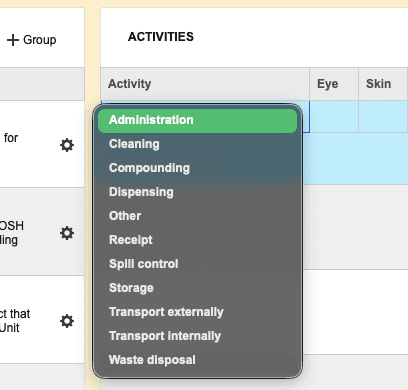
- Click the Activity cell and choose a value from the dropdown (e.g., Dispensing).
- Move right and select the exposure level for Eye, Skin, Inhalation, Ingestion, and Injection.
- Add any relevant Observations.
- Save the row.
Safe Handling Practices & PPE
Include recommended handling guidance and required PPE for each group/activity:
- Safe Handling Practices — e.g., use of conventionally manufactured dosage forms that require only packaging, engineering controls, or work practice controls.
- PPE (Personal Protective Equipment) — Examples: cleanroom suit, nitrile gloves, masks, eye protection, face shield.
Add these recommendations in the group's notes or the Activity Observations field.
Managing Groups and Activities
Click the gear (Actions) icon to the right of a Group or Activity to access:

- Edit — Open the edit popup to modify fields. Click Save after changes.

- Delete — Opens a confirmation dialog with DELETE (permanent) and CANCEL options.
- Change Logs — Opens the Record Modification Log showing who changed what and when. Click X to close.
Best Practices
- Use clear, unique Codes and detailed Descriptions for groups to ensure consistent risk classification.
- Prefer multi-select fields for Type of HD, Product Type, and Manipulation to capture all relevant attributes.
- Document Safe Handling Practices and PPE recommendations with each group to ensure staff follow controls.
- Review change logs regularly to maintain audit readiness and document rationale for risk-classification updates.
Pharmacy Settings (System Foundation)
Pharmacy Settings provide the foundational templates and defaults required for system operation. These settings must be completed before using other areas of SiCompounding.
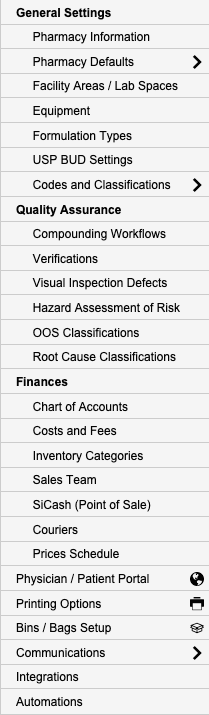
Best Practice: Enter all available and required data for each section and subsection to ensure proper system behavior, compliance, and reporting across SiCompounding.
This completes the step-by-step guide for Adding Hazard Assessment Of Risk in SiCompounding.