
Changing the Dosage Units Status?
Step-by-step instructions for viewing, searching, and managing the active or inactive status of FDA-defined dosage units within SiCompounding.
Overview
The Dosage Units section contains the official FDA dosage unit codes used throughout the system. Each dosage unit includes a code, name, description, and an active or inactive status. https://www.fda.gov/industry/structured-product-labeling-resources/units-presentation
By updating the status of a dosage unit, you control whether it is available for use in prescription orders and compounding workflows.
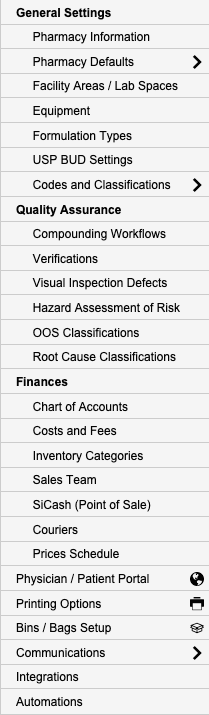
Dosage Units are maintained within the Codes and Classifications area of Pharmacy Settings.
Dosage Units Table Structure
The Dosage Units table displays the following columns:
| Column | Description |
|---|---|
| Code | Official FDA code for the dosage unit |
| Dosage Name | Standard unit name |
| Dosage Description | Detailed description of the unit |
| Status | Visual slider indicating Active (green) or Inactive (gray) |
Accessing Dosage Units
Follow the steps below to navigate to the Dosage Units management screen.
Step-by-Step Instructions
Navigation Path
- Click the FileMaker Pro icon to open FileMaker.
- When FileMaker opens, locate the large menu bar on the left side of the window.
- Click SiCompounding (near the top).
- In the next window, several icons appear across the middle of the screen.
- Click Pharmacy to open the Dashboard.
- From the blue sidebar menu, scroll to the bottom and select Settings.
- Under General Settings, select Codes and Classifications.
- The Code Classifications section allows users to manage standardized codes for prescription orders.
- From the popup list, select Dosage Units.
Viewing and Searching Dosage Units

The Codes – Dosage Units window opens and displays a list of dosage units.
Search Options
You can search by:
- Code
- Dosage Name
- Dosage Description
Enter the desired search term in the Search bar located in the upper-right corner and press the Enter/Return key to view results.
Changing Dosage Unit Status
In the Codes – Dosage Units window, the only available action is to update the unit’s status.
Status Control
- Use the Status slider to change availability:
- Green – Active
- Gray – Inactive
Note: Dosage units set to Inactive will not be available for selection in prescription orders.
Pharmacy Settings (System Foundation)
Pharmacy Settings provide the foundational templates and defaults required for system operation. These settings must be completed before using other areas of SiCompounding.
Best Practice: Enter all available and required data for each section and subsection to ensure proper system behavior, compliance, and reporting across SiCompounding.
Summary
Managing Dosage Unit status ensures:
- Only approved FDA dosage units are available for use
- Accurate and standardized prescription data
- Consistent compounding workflows
Dosage Units should be reviewed periodically and updated as regulatory guidance or pharmacy practices change.